ADD SOLUTION
JumpServer | PAM

Administrative access under control, from login to audit

Centralize access to servers, network equipment, databases and applications with a PAM platform that combines identity, authorization and session traceability.

The design must consider edition, version, protocols, evidence storage, high availability and recovery. Features vary by project.

ACESSO PRIVILEGIADO

Who can access, with which account and for how long?

An administrative account can change configurations, interrupt services, access sensitive information and create new access paths. When the same credential is shared among people, it becomes unclear who performed each action. When access remains open after an intervention, the risk remains too. JumpServer organizes the relationship between the authenticated person, the authorized asset and the account used at the destination. The platform acts as an intermediary for the access paths included in the project, bringing policies and evidence together in an administration environment. For this control to be effective, deployment must also address alternative paths. If the same server continues to accept direct administrative connections from any source, some operations may take place outside the PAM audit trail. Segmentation, network rules, permissions on the destination system and exception procedures are part of the architecture. Explore the JumpServer platform

Fontes técnicas
IDENTITY, AUTHORIZATION AND EVIDENCE

Four controls that need to work together

CONTROLES

Identity: know who is requesting access

Integration with Active Directory/LDAP enables the corporate directory to be used for authentication. MFA adds a login check, with policies that can cover administrators or all users. The design must include contractor onboarding, second-factor recovery and offboarding without turning emergency accounts into permanent shortcuts. SSO integrations and features such as LDAP HA vary by edition. Authenticating a person in JumpServer does not, on its own, grant administrator permissions on a server or access to any asset. LDAP/AD authentication · Authentication security

CONTROLES

Authorization: define the permitted work

Rules link users or groups to assets or asset sets, accounts, protocols and actions. Defined validity periods can be used, with separate permissions for connections, file transfers and clipboard controls on compatible paths. A useful authorization describes a work requirement: which systems the professional supports, with which account and during which period. The same care applies to group and node inheritance; an inventory change must not expand access unnoticed. Access request and approval workflows are features subject to the Enterprise edition. When needed, they must be included in the scope from the start, with defined owners, validity and exception handling. Authorization rules · Request-based approval

CONTROLES

Accounts and credentials: control usage and lifecycle

Registration associates accounts with assets to enable authorized connections. In managed-credential flows, access can take place without the operator entering the destination password. This helps reduce its circulation but requires care over who can view, export or administer those credentials. Discovery, provisioning and password changes are different stages. Registering an account in PAM does not prove that it was created on the device, has the expected permissions or that a dependent application will continue to work after a change. Automated password and key rotation is documented as an Enterprise feature. Adoption requires compatibility testing, post-change validation, failure handling and an owner for affected service accounts. Account management · Credential rotation

CONTROLES

Auditing: produce usable evidence

JumpServer brings together records of logins, administrative operations, sessions, commands and transfers according to the protocols and features used. Session recording, playback and monitoring help analyze interventions and investigate events. The evidence must make it possible to locate the person, asset, account, time and relevant activity. Recording the screen without a retention policy, access to records and operational integrity checks leaves investigations to chance. Command filters and transfer restrictions can limit actions in supported flows. They must be tested with the team's actual tools: a graphical session, shell, database client and published application do not offer the same control granularity. Auditing and control features

Fontes técnicas
PROTOCOLOS E DESTINOS

One access point for different environments

AMBIENTES

Linux, Unix and network equipment

SSH sessions and SFTP operations can be organized in the same access environment. The authorized account at the destination, effective privileges and command rules must reflect the operator's role. Network equipment requires platform-specific validation, including prompt behavior, authentication and administrative commands. In legacy environments that still depend on Telnet, technical compatibility must be addressed alongside analysis of unencrypted traffic and a plan to reduce that exposure. KoKo connector

AMBIENTES

Windows and graphical sessions

RDP access enables administration of Windows assets through paths supported by the deployed version and edition. Browser, native client and protocol proxy have their own requirements and behaviors; the choice must consider user experience, destination authentication, recording, and copy, paste and file transfer controls. Validation testing must use the Windows versions and security policies actually adopted. The presence of a protocol in the catalog does not prove unrestricted compatibility with every combination of operating system, credential and client. Lion graphical connector · Editions and access methods

AMBIENTES

Databases and Kubernetes

The portfolio includes access to databases and Kubernetes clusters. The project selects supported mechanisms, the connection method and the appropriate edition while respecting each environment's native permissions. In databases, audit coverage also depends on the connector and client used. In Kubernetes, the access platform's authorization must be combined with the cluster's RBAC. The goal is to preserve a verifiable relationship between the person, the credential used and the resources they can administer. Asset types

AMBIENTES

Web systems and administrative applications

Web applications can be accessed through a browser running on a publishing machine. JumpServer provides credential filling through selectors or scripts, according to the application's authentication flow. This model requires validation of each system, especially where there are multiple login screens, separate MFA, pop-ups or frequent interface changes. RemoteApp publishes specific applications from a Windows host. VirtualApp uses applications in containers managed by the Panda component and is an Enterprise feature. In the Windows model, documentation includes Remote Desktop Services requirements and corresponding licensing. The architecture must restrict the publishing machine's browsing and connectivity to what is necessary. Publishing a browser for an application does not, on its own, prevent all access to other destinations. Web assets · RemoteApp · Windows publishing machine · VirtualApp

Fontes técnicas
USE CASES

Scenarios where a PAM project makes a difference

CENARIOS

Internal infrastructure and support teams

Organize permissions by responsibility and reduce everyday use of broadly privileged credentials. Separating platform administration from evidence access helps establish clearer responsibilities and reviews.

CENARIOS

Contractors and vendor support

Grant the access needed for an intervention, with an identified account, bounded assets and a defined period. When the project uses approval, authorization must be linked to the system owner and the activity's context.

CENARIOS

Distributed environments and multiple sites

Plan connectivity, entry points and component locations according to asset distance, latency and network restrictions. Segregation between organizations depends on edition features and validation; a visual asset tree alone does not demonstrate separation between customers.

CENARIOS

Critical systems operations

Define how the team works when the directory, identity provider, storage or PAM itself becomes unavailable. Contingency access must be restricted, protected and reviewed after use.

CENARIOS

Investigation and access review

Locate interventions, review access grants and check whether policy is being applied. To do this, it is useful to measure inventory coverage, recording integrity and the handling of access outside the expected flow.

ARQUITETURA PAM

Architecture sized for operations

JumpServer is a self-hosted platform with specialized components. Its architecture combines administration and access interfaces, core services, protocol connectors, and data and storage layers. The composition changes by version, edition and connection methods. An initial design must answer: • How many assets and operators will be served, and how many sessions will run simultaneously? • What proportion will be terminals, graphical sessions, databases and published applications? • Where are the assets, what network paths exist and what latency is acceptable? • How long must records remain available and what recording volume is expected? • Which failures must operations tolerate, and how will access be recovered? Asset count and concurrent session count represent different needs. RDP, video, file transfer and publishing machines can require very different resources from a terminal session. In distributed architectures, the load balancer must handle sessions and WebSockets correctly. Databases, Redis and storage also need a continuity design. Multiplying application servers without addressing these dependencies leaves single points of failure. Documented v4 architecture · Current distributed deployment reference

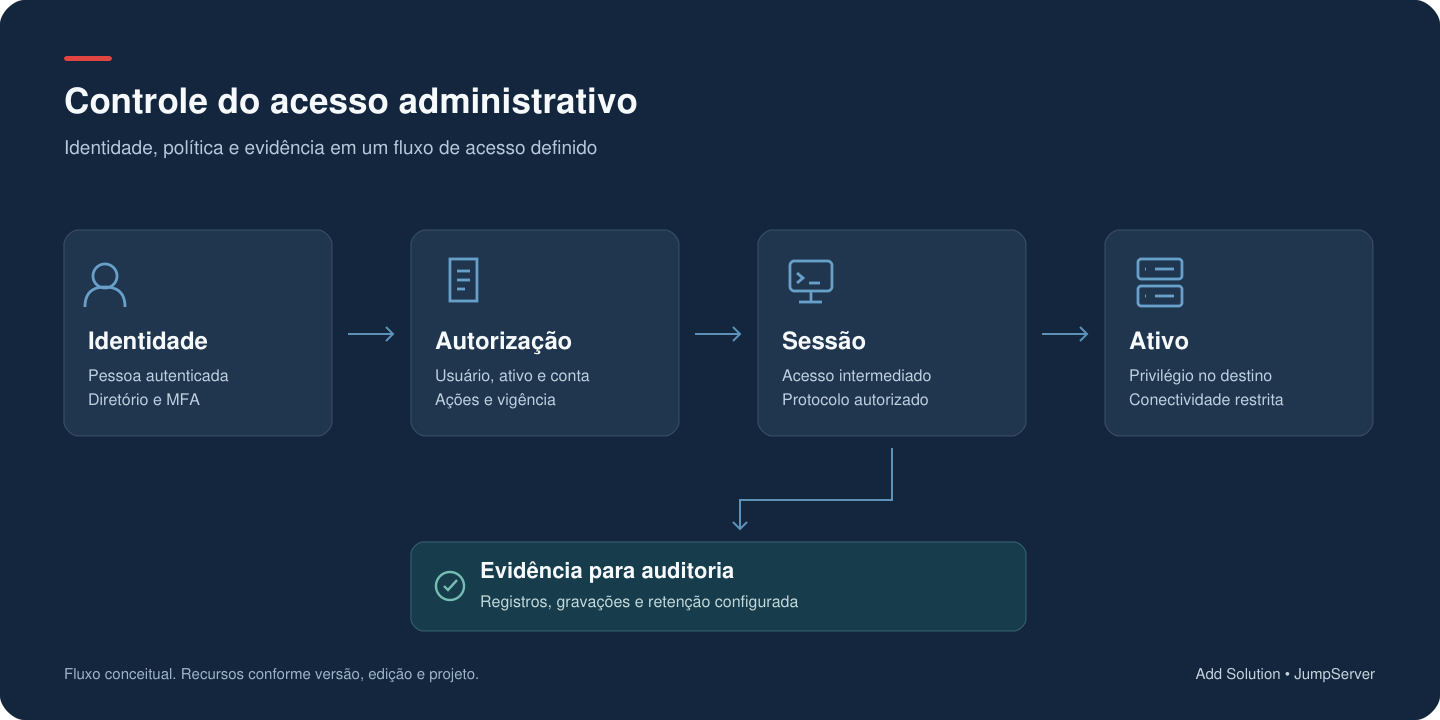
Identidade e política autorizam uma sessão intermediada até o ativo; registros da atividade apoiam a auditoria.
Conceptual administrative access flow. Features depend on version, edition and project.

The operator's identity and authorization policy determine permitted access. The session is brokered through to the authorized asset, while compatible events, commands and recordings form audit evidence. The diagram is conceptual and does not represent an official JumpServer v5 topology.

  1. IDENTIDADE

    User, directory and authentication according to the defined policy.

  2. AUTORIZAÇÃO

    Permitted asset, account, protocol, action and access window.

  3. BROKERED SESSION

    Controlled connection between the operator and the authorized destination.

  4. EVIDÊNCIA

    Events, commands and recordings according to protocol, edition and project.

Fontes técnicas
SECURITY AND CONTINUITY

PAM security and access continuity

OPERACAO

Protect the platform that concentrates privileges

Deployment must provide for HTTPS, MFA, strong credentials, restricted service exposure, operating system and component updates, and controlled administrative access. Network design must consider both operator ingress and connector egress to assets. PAM is part of the organization's critical attack surface. Security advisories, new versions and dependencies must enter the update process, with validation testing and change windows proportionate to risk. Official security recommendations · Project security advisories

OPERACAO

Size retention and protect evidence

Recordings can be stored locally or at compatible external destinations. Command logs have their own configuration. The choice affects capacity, availability, querying and recovery. Periodic session cleanup controls records, commands and local recordings. The documentation states that external object and command storage is not affected by this setting. The policy therefore needs to be consistent across JumpServer and the storage services used. Records may also contain sensitive information displayed during a session. Access must be restricted to the audit purpose, with query, export and disposal rules agreed with the organization. Recording storage · Command storage · Retention and cleanup

OPERACAO

Demonstrate recovery and failure behavior

The backup plan must cover the data, persistent files, configurations and cryptographic material needed for restoration. The documentation emphasizes compatibility between the database, files and configuration keys when recovering between environments. A restoration test must demonstrate authorized access and access to recovered evidence. A high-availability design must also assess what happens to new connections and ongoing sessions during a failure. Continuity must not be assumed from a healthy container. Backup and recovery

Fontes técnicas
INTEGRATIONS UNDER CONTROL

Integrations with defined responsibilities

Integration can connect PAM more closely to the directory, asset inventory, security operations and service processes. Each connection must define the data source, automation permissions, failure handling and how the result is checked. A provisioning integration, for example, must distinguish asset registration, the existence of the account on the device, credential storage, usage authorization and the actual connection. If one of these stages fails, the process must indicate the pending state and allow controlled recovery. Enterprise documentation provides for external credential storage in HashiCorp Vault, Azure Key Vault and AWS Secrets Manager. Integrations with other vaults, portals or operational platforms must be assessed as integration work, with their own compatibility and maintenance requirements. When sending events to a log platform or SIEM, the scope must specify which records reach the destination and how they will be interpreted. Transporting a log does not automatically deliver a detection rule or a response process. External credential storage · Log configuration

Fontes técnicas
COMMUNITY E ENTERPRISE

Community or Enterprise: choose by requirements

The Community edition provides an open foundation for access and auditing. The global offering consulted states free use for up to 5,000 assets. This does not eliminate infrastructure, deployment, operations and maintenance costs. The Enterprise edition adds features that may be decisive for the project, such as corporate SSO, custom roles, multiple organizations and commercial support options. Access approval, automated rotation, certain connectors and high-availability options also require edition and plan checks. The choice must start with the requirements matrix. A project that depends on customer segregation, approval workflows and account rotation must validate those functions in the proposed edition before defining the architecture and investment. Add Solution support and vendor support have their own scopes. Coverage, hours, responsibilities and commercial terms are defined in the proposal; a product license does not automatically create an SLA for every service involved. Official commercial comparison · Project license

Fontes técnicas
ENGENHARIA ADD SOLUTION

How Add Solution delivers the project

SERVICOS

Current-state assessment

Mapping of administrative access, priority assets, accounts, owners and dependencies. This stage identifies credential sharing, excessive permissions and paths that need to be brought under control.

SERVICOS

Architecture and scope definition

Selection of edition, access methods, integrations, storage and continuity model. Acceptance criteria are defined with the teams that administer systems and consult evidence.

SERVICOS

Deployment and integration

Configuration of the platform and planned policies, integration with agreed services and preparation of operational flows. Asset onboarding must be progressive to validate compatibility and reduce the impact on day-to-day work.

SERVICOS

Validation testing with real situations

Testing of allowed and denied access, permission expiration, recording and playback, applicable restrictions and recovery. Where credential automation is used, testing must include the result on the device and the account's dependencies.

SERVICOS

Operations and evolution

Documentation, team guidance and support according to the contracted service. Access reviews, upgrades, capacity and evidence checks must have defined owners so that the platform remains useful after deployment. The deliverables and services for each stage are detailed in the proposal, according to the environment and engagement.

VALIDATION TESTING

What to demonstrate before going live

• Authorized users find only the assets and accounts intended for their role • A person without permission cannot access the asset, including through an unapproved alternative path • Offboarding, expiration and revocation have known behavior for new connections and ongoing sessions • Protocol, file, clipboard and command restrictions work in the selected flows • A test session can be located and replayed by those with audit responsibility • Component unavailability, recording failures and storage problems are detected and routed for handling • The backup can be restored with the necessary evidence and configurations • The contingency procedure can be executed without keeping broad access permanently open

PERGUNTAS FREQUENTES

Perguntas frequentes

What is JumpServer?

It is a privileged access management, or PAM, platform that centralizes entry to managed assets and brings together identity, authorization, account and audit controls. Its use must be bounded by the protocols, features and edition selected for the environment.

Does JumpServer replace VPN, firewall or Zero Trust?

It controls the administrative sessions included in the project. VPN, firewall, segmentation and identity controls may remain necessary for connectivity and protection of the environment. A Zero Trust architecture requires additional decisions about identity, devices, networking and authorization; installing PAM is one possible part of that design.

Does the team need to know every server's password?

In flows configured with managed credentials, the platform can establish the connection without requiring the operator to enter the asset's password. The project must also control who administers, views or exports credentials and which access paths remain possible outside PAM.

Must an agent be installed on every asset?

Access uses protocols supported by the destinations. Requirements vary by function: a session, an automation task and a published application may need different services or components. RemoteApp/VirtualApp publishing machines, for example, are part of additional infrastructure that must be planned for.

Can Active Directory and MFA be used?

Yes. LDAP/AD and MFA are documented by the project. The integration method, second-factor recovery, authorized groups and offboarding process must be configured and tested. SSO and LDAP HA depend on the edition.

Are all sessions and actions recorded?

Coverage depends on the connection method, configuration, storage and features in use. The project must demonstrate what is recorded in each flow. Graphical session recordings, command logs and destination application history are evidence with different scopes.

Can JumpServer work with an existing vault?

External providers are documented for the Enterprise edition. Other vaults may require a specific integration. The assessment must define who keeps the credential valid, how updates take place and what happens if the vault or synchronization fails.

Can high availability be deployed?

There are distributed architecture references and Enterprise offerings with HA options. The outcome depends on the plan, the design of application and data layers, and failure tests. RTO, RPO and session behavior must be agreed and demonstrated in the project.

Does using PAM guarantee compliance?

Controls and records can support governance and auditing. An organization's compliance also depends on processes, people, configuration, the purpose of data processing and applicable requirements. The product alone does not demonstrate compliance across the entire environment.

How is the investment calculated?

The assessment considers edition, asset count and types, concurrency, publishing machines, integrations, retention, continuity and services. Any required third-party licenses and support responsibilities must be clearly stated in the proposal.

SOLUÇÕES RELACIONADAS

Security integrated with operations.

ADD SOLUTION + JUMPSERVER

Shall we organize administrative access to your environment?

Talk to Add Solution about identities, assets, protocols, integrations, retention and continuity. Do not submit passwords, keys or other credentials through the form.

CONVERSATION CONTEXTYou are contacting Add Solution about JumpServer — segurança e arquitetura.
CONVERSA COM ESPECIALISTA

How can we protect your environment with JumpServer?

Conte o cenário atual e o resultado esperado. A solicitação será encaminhada aos especialistas adequados.

01
About youHow can we contact you?
* Campos obrigatórios
Your data is sent securely and used only to respond to the request. See our Privacy Policy. · Terms of Use.